The office and the field, on the same ticket.
Field Ticket Manager is the home base for every locate you own - dispatched over the web, tracked through open, dispatched, overdue and complete, drawn and filled out in the field (online or off), then synced back and billed. One queue, one map, one source of truth.
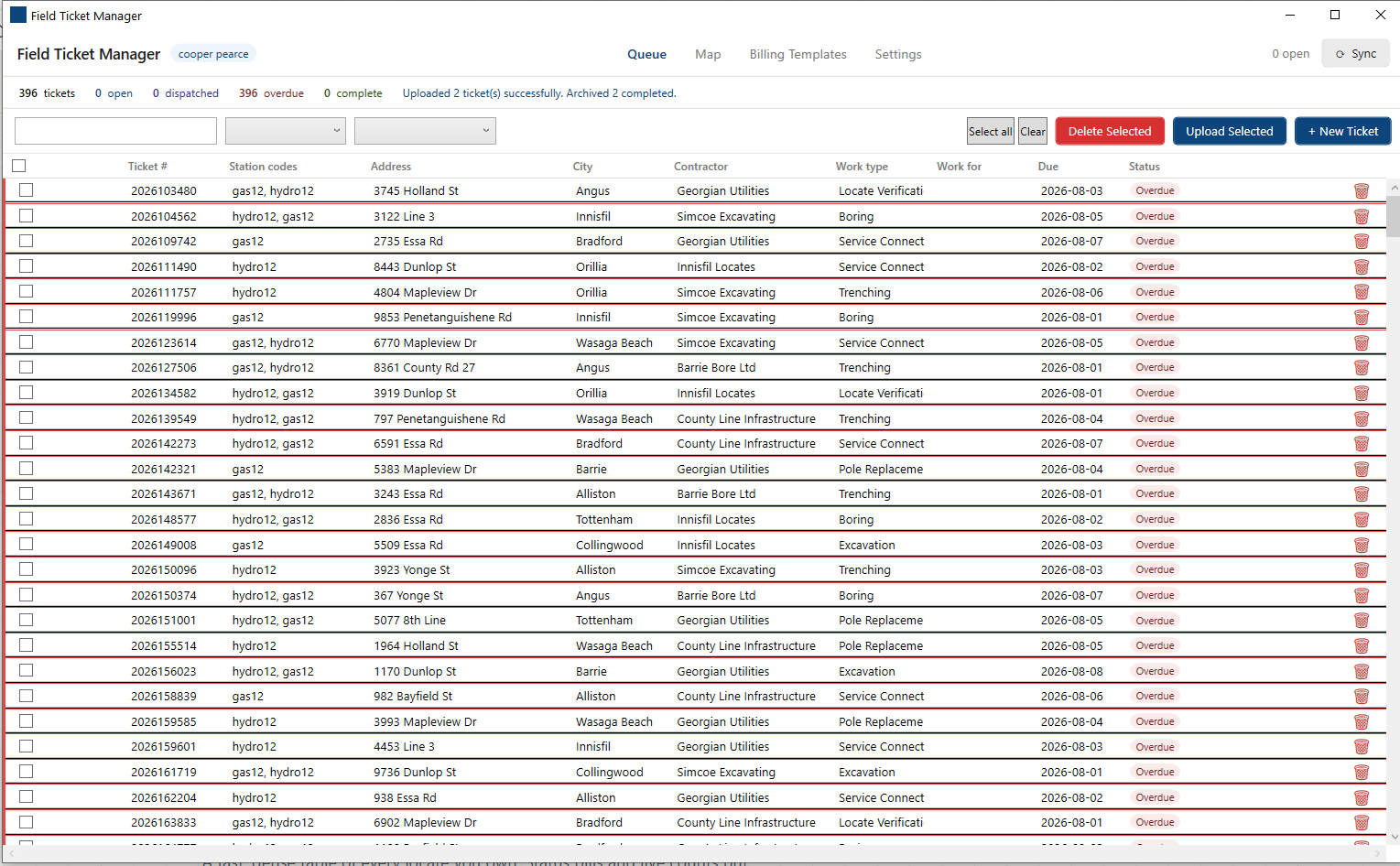
| Ticket | Location | Type | Status | Due |
|---|---|---|---|---|
| 2026-441702 | Maple St & 4th | Emergency | Overdue | Today |
| 2026-441688 | 120 Birch Cres | Routine | Dispatched | Jul 29 |
| 2026-441675 | Hwy 6 & Concession 4 | Design | Open | Jul 30 |
| 2026-441640 | 88 Elm Ave ◳ drawing | Routine | Complete | - |
| LOCAL-0007 | Yard hydrant tie-in | Local draft | Local | - |
Every ticket, colored by what it needs from you.
A fast, dense table of every locate you own. Status pills and live counts put the overdue and unassigned work first, and the grid holds your place through every filter and sort.
Live status & counts
Total, open, dispatched, overdue and complete tallies update as you work, with a color pill on every row - plus a "Local" state for drafts not yet on the server.
Search, filter & sort
Search by number or location, filter by status or work type, sort any column. The list rearranges in place, keeping your scroll position and selection.
One-tap sync
A single Sync pulls your latest assignments and pushes finished work, with a progress bar you can cancel - and a loud alert if a completed ticket has been flagged for a redraw.
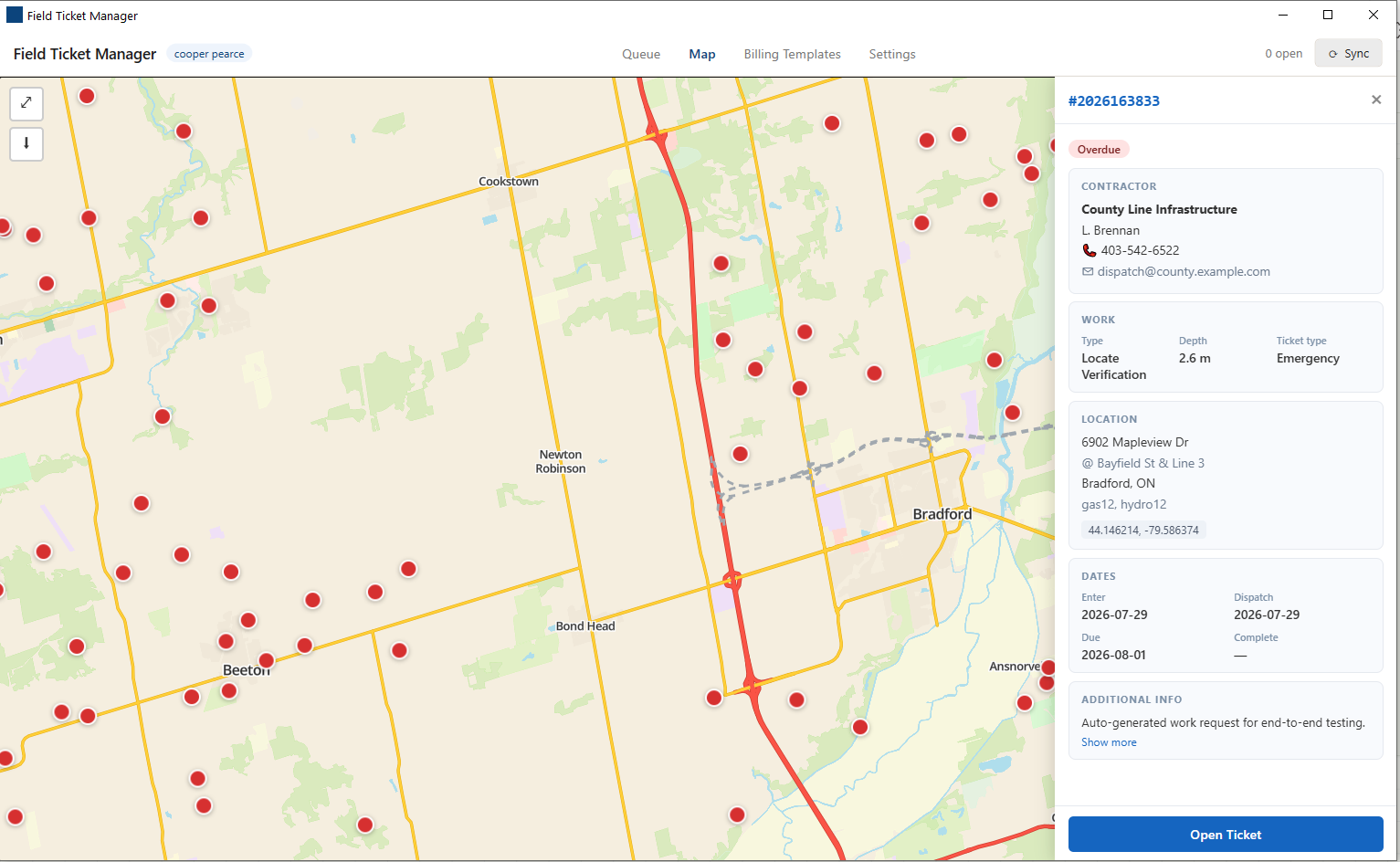
See the day on a map - and hand it out.
Every ticket with coordinates drops a pin on a full vector basemap. The office assigns work over the web; each crew's token pulls exactly the tickets meant for them, and a privileged user can dispatch straight to any worker.
- Pins colored by status - spot every overdue job across town at a glance.
- Tap a pin for the detail drawer - contractor, work type, dates, location.
- Assign from the office and it lands in the worker's queue on next sync.
- Works offline - tiles you've panned over are cached, and you can pre-download a whole province.
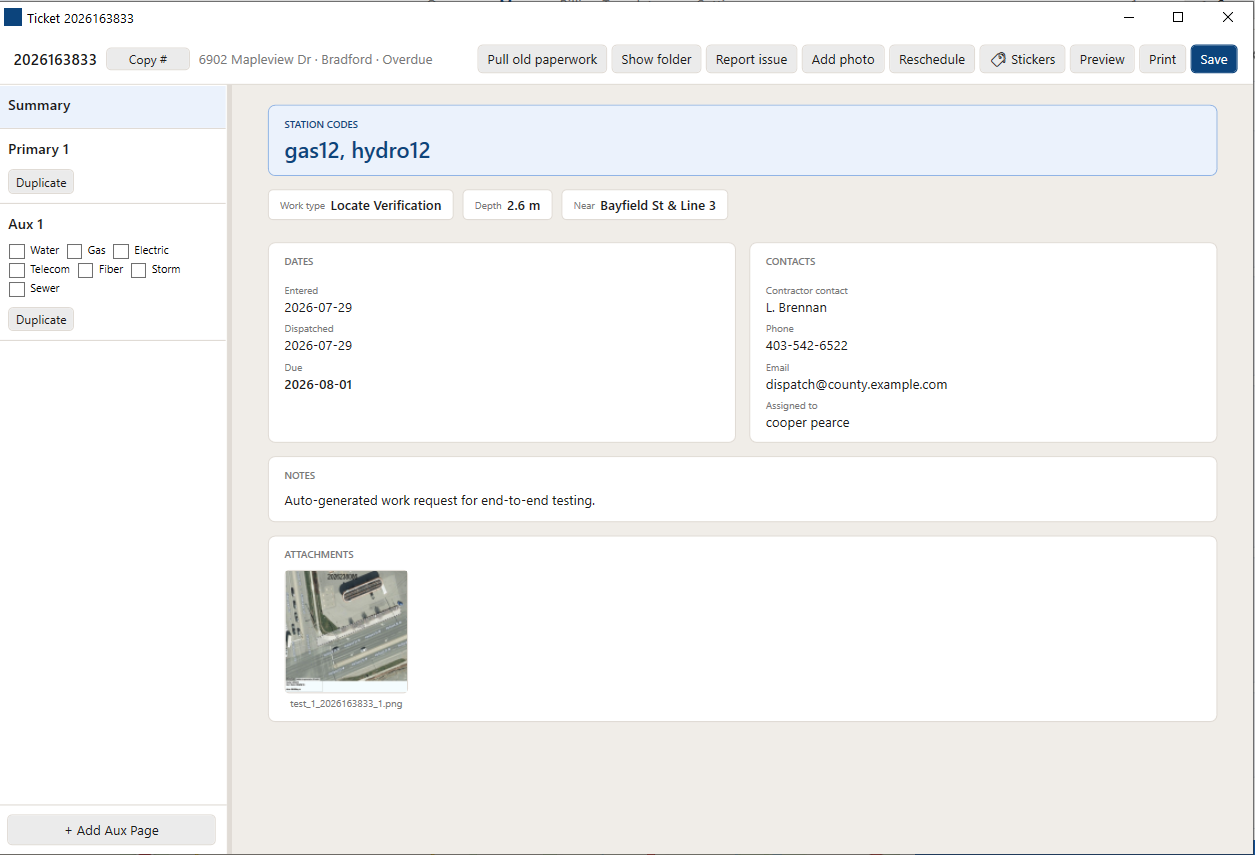
Open a ticket, and everything about the job is there.
Each ticket opens in its own window with a full set of pages. Forms, photos, stickers, notes and the drawing all live together - and the app tracks unsaved changes so nothing walks out the door half-done.
The core record
Work location, contractor and contact, station codes, on-site arrival & departure times, "completed by" and employee number, and notes to excavators.
A page per drawing
Auxiliary pages hold the field sketches, each paired to its DrawPyCS drawing by position, with image stickers you can place, drag and resize over the page.
Ready to hand off
A summary page pulls it together; print-preview and print the whole ticket to any page. Unsaved-change tracking means you're always warned before closing dirty work.
"Complete" means actually complete
A ticket only flips to Complete when the primary page has both arrival and departure times and the first aux page has a drawing - so the queue's counts reflect finished work, not just opened tickets.
Charges that come out right
Reusable billing layouts key to stable contractor codes and per-employee numbers rather than row position, so billables group correctly no matter how a template is arranged.
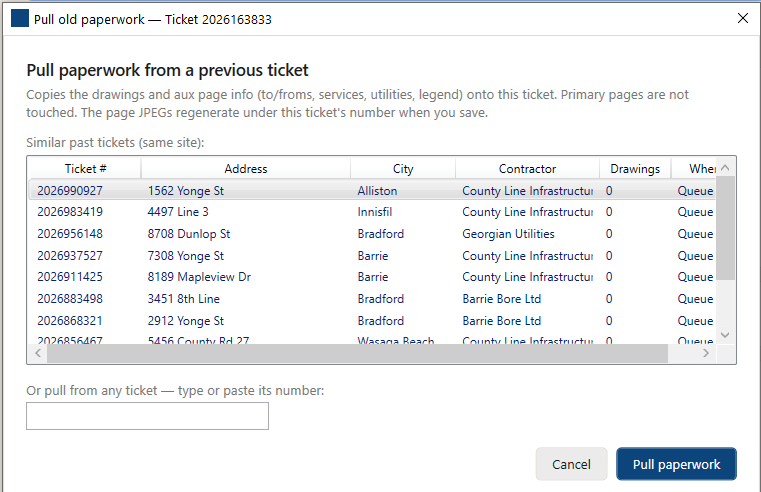
| Old ticket | Location | Where | Dwgs |
|---|---|---|---|
| 2025-338815 | Maple St & 4th | Archive | 3 |
| 2025-291044 | Maple St (S) | Queue | 1 |
| 2024-905127 | 4th Ave W | Archive | 2 |
Never redraw a job you've already drawn.
Locate paperwork expires every 60–90 days and gets re-issued under a brand-new number. Field Ticket Manager knows this: it scans your queue and archive for earlier paperwork on the same job and offers it up, scored best-match-first.
- Pull aux pages & drawings from a past ticket in one step - copied under the new ticket's naming.
- Search by number too - pull from any ticket, not just the suggestions.
- Restore from archive to re-open and re-upload a completed ticket once the office unlocks it.
- Reschedule work and get flagged when a finished ticket needs a redraw.
Built so the field never waits on a signal.
The whole loop runs on the truck with no bars. Dispatch pulls when connected; drawing, forms, photos and the map all work offline and upload the moment you're back.
Dispatch
Staff assign tickets to crews from anywhere. Each worker's token is their identity - it pulls only their jobs.
Complete offline
Open the ticket, draw the locate, fill the forms, add photos - no connection required.
Sync back
One tap uploads everything and refreshes the queue, with a clear alert on any redraw.
Photos, ready for the office
Job-site images route to hot storage so office staff can review completed work right away - keyed to the ticket by an explicit ticket-id field on every upload.
Form & drawing data, backed up
Form XML and checksums go to cold storage as a recreatable backup. Drawing PNGs are skipped on purpose - they regenerate from the drawing XML, so only the source travels.
See the whole loop, end to end.
Book a walkthrough and we'll dispatch one of your jobs, complete it in the field offline, and sync it back - so you can judge it against how your team works today.